Test Action Type
The Test action type is used in Host-based command sequencing to wait for a specified period. The primary use of this action is to halt the process until the well test time has elapsed before processing the well test record. This is also useful in a variety of situations, such as waiting for the purge time to complete and testing if a point value changed to a desired value after a UIS command action.
The Test action type supports Conditional Actions and Steep Time Actions.
Condition Action
The Test action type also supports a series of conditional properties that can be used to interact with the primary test action. They represent the values of an expression and when the expression is true, the conditional actions defined will be executed. For example, specify an Exit action to exit the well test sequence. In the XML configuration these conditional actions are specified in the <ExitOnTagValueActions> element.
Notes:
- The condition is evaluated every time the Sleep timer has elapsed
- If the condition is true then the Test action will stop and the next action in the well test command sequence is executed
- The condition actions are optional:
- If the condition is true and there are condition actions defined, those actions will execute and then move on to the next action in the well test command sequence
- If the condition is true and there aren’t any condition actions, CygNet simply moves on to the next action in the well test command sequence
Sleep Time Action
The Monitor or Test action types support the configuration of sleep time action(s) to specify how long the Test or Monitor action type will "sleep" before updating the actual timeout value and evaluating the conditional expression. If any actions are specified for the Sleep time actions, then for every sleeptime timeout specified, those actions will be executed. For example, wait five seconds and then poll the device. In the XML configuration these conditional actions are specified in the <SleepTimerActions> element.
|
Click the thumbnail to see the |
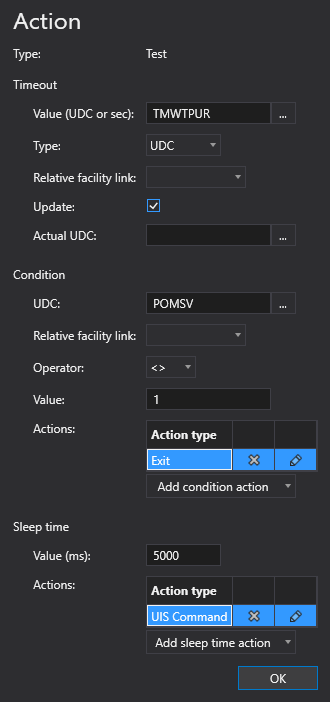
To configure a Test action
A Test action type can be configured from several different places within the well test configuration control. However, the base configuration is always the same. Perform the following steps to configure this type of action, referring to the property definitions below:
- Click to Add action from the drop-down menu.
- Select the Test action type from the Action type list. The action's properties will appear on the right.
- Configure the Timeout properties for the Test action:
- Select the Type for the value: Self or UDC.
- Type the Value (UDC or ms) for the timeout Test action.
- If the Type is Self, enter an alphanumeric value.
- If the Type is UDC, click the browse button to open the Select UDC dialog box and select an appropriate UDC.
-
Optional. Select a relative facility tag from the Relative facility link drop-down menu.
Note:
If the Type is set to Self, the Relative facility link property is hidden from view. - Indicate whether to Update the timeout.
- Select the Actual UDC.
- Configure the Condition properties for the Test action:
- Select the UDC to use for the conditional expression. Click the browse button to open the Select UDC dialog box and select an appropriate UDC.
- Optional. Select a relative facility tag from the Relative facility link drop-down menu.
- Select the desired Operator from the drop-down menu.
- Type the alphanumeric Value for the conditional expression.
- Add and configure appropriate a conditional Actions. Repeat as necessary.
- Configure the Sleep time properties for the Test action:
- Type the Value (ms) for the sleep action.
- Add and configure appropriate sleep time Actions. Repeat as necessary.
- Click OK to accept the configuration.
Action Properties
The properties for the Test action type are described below.
| Property | Description | XML |
|---|---|---|
|
Type |
Specifies the action type for the action. |
|
|
Timeout |
||
|
Value (UDC or sec) |
Specifies how the amount of time the test action will wait. Options include an actual value in seconds or a value from an associated point:
|
|
|
Type |
Specifies the timeout value type. Values include Self or UDC. |
|
|
Relative facility link |
Specifies the relative facility tag to use for the action. E.g., Separator Note: |
|
|
Update |
Indicates whether to update the actual timeout. Click the check box to enable the update. Options include True or False. If this value is set to True, then the point resolved in this action will be updated with the actual time spent waiting. |
|
|
Actual UDC |
Specifies the actual UDC to use to post as a running count of how long the actions have been in the timeout. Click the browse button to open the Select UDC dialog box and select an appropriate UDC. |
|
|
Condition |
||
|
UDC |
Specifies the UDC to use for the conditional expression. Click the browse button to open the Select UDC dialog box and select an appropriate UDC. |
|
|
Relative facility link |
Specifies the relative facility tag to use for the conditional expression for this action. Note: |
|
|
Operator |
Specifies the operation used for the comparison. Acceptable values include:
|
|
|
Value |
Specifies the alphanumeric value to compare to the point value in the conditional expression. |
|
|
Actions |
The Test action type also supports a series of conditional properties that can be used to interact with the primary test action. They represent the values of an expression and when the expression is true, the conditional actions defined will be executed. For example, specify an Exit action to exit the well test sequence. In the XML configuration these conditional actions are specified in the <ExitOnTagValueActions> element. Notes:
To add a condition action
|
|
|
Sleep time |
||
|
Value (ms) |
Specifies the time in milliseconds that the Monitor or Test action will "sleep" before updating the actual timeout value and evaluating the defined conditional actions. When the Sleep time timeout (sleeptime) expires, the actions defined in the Sleep Time Actions grid <SleepTimerActions> will be executed. For example, wait five seconds and then poll the device. |
|
|
Actions |
The Monitor or Test action types support the configuration of sleep time action(s) to specify how long the Test or Monitor action type will "sleep" before updating the actual timeout value and evaluating the conditional expression. If any actions are specified for the Sleep time actions, then for every sleeptime timeout specified, those actions will be executed. For example, wait five seconds and then poll the device. In the XML configuration these conditional actions are specified in the <SleepTimerActions> element. To add a sleep time action
|
|
 to add a new conditional action to this Test action.
 or the action type name to edit the action.
 to delete the action type, as necessary.
 to add a new sleep time action to this Test action.

